本文共 11470 字,大约阅读时间需要 38 分钟。
一、nginx的配置文件
1、常见的配置文件及其作用
nginx常见配置文件位置:安装路径/conf目录中。
[root@centos7 nginx]# tree.├── conf│ ├── fastcgi.conf│ ├── fastcgi.conf.default│ ├── fastcgi_params│ ├── fastcgi_params.default│ ├── koi-utf│ ├── koi-win│ ├── mime.types│ ├── mime.types.default│ ├── nginx.conf│ ├── nginx.conf.default│ ├── nginx.conf.old│ ├── scgi_params│ ├── scgi_params.default│ ├── uwsgi_params│ ├── uwsgi_params.default│ └── win-utf├── html│ ├── 50x.html│ └── index.html└── sbin └── nginx
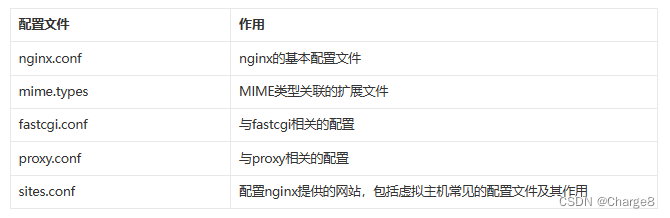
2、nginx主配置文件
nginx主配置文件:/usr/local/nginx/conf/nginx.conf
默认启动 nginx时,使用的配置文件是:安装路径/conf/nginx.conf文件。
可以在启动 nginx时通过 -c选项来指定要读取的配置文件。
2.1 nginx.conf原本配置
先看下原本的配置,这里加了说明注释。
[root@centos7 nginx]# cat ./conf/nginx.conf# 1、main全局块(全局设置), 作用域是全局#Nginx用户及组:用户 组。window下不指定#user nobody;#工作进程:数目。根据硬件调整,通常等于CPU数量或者2倍于CPU。worker_processes 1;#错误日志:存放路径。#error_log logs/error.log;#error_log logs/error.log notice;#error_log logs/error.log info;#pid(进程标识符):存放路径。#pid logs/nginx.pid;# 2、events块(nginx工作模式)events { #每个工作进程的最大连接数量。根据硬件调整,和前面工作进程配合起来用,尽量大,但是别把cpu跑到100%就行。 #每个进程允许的最多连接数,理论上每台nginx服务器的最大连接数为。worker_processes*worker_connections worker_connections 1024; }# 3、http块(http设置)http { #设定支持的mime类型,类型查看./conf/mime.types文件定义 include mime.types; # 默认的类型 default_type application/octet-stream; # 日志的格式 #log_format main '$remote_addr - $remote_user [$time_local] "$request" ' # '$status $body_bytes_sent "$http_referer" ' # '"$http_user_agent" "$http_x_forwarded_for"'; # 访问日志记录 #access_log logs/access.log main; # 开启 发送文件 sendfile on; # 开启 TCP 推送 #tcp_nopush on; #连接超时时间。 #keepalive_timeout 0; keepalive_timeout 65; # 开启压缩文件 #gzip on; ## ====sever块(主机设置) server { # 提供服务的端口,默认80 listen 80; # 提供服务的域名主机名 server_name localhost; #charset koi8-r; # 访问日志记录 以及位置 #access_log logs/host.access.log main; # location块(URL匹配):支持正则表达式 # 对 "/" 启用反向代理,第一个location区块开始 location / { #服务启动目录 默认在nginx安装目录下html目录 root html; # 默认的首页文件,多个用空格分开 index index.html index.htm; } # 错误页面路由 # 出现对应的http状态码时,使用50x.html回应客户 #error_page 404 /404.html; # 将服务器错误页重定向到静态页/50x.html # redirect server error pages to the static page /50x.html # error_page 500 502 503 504 /50x.html; # location区块开始,访问50x.html location = /50x.html { # 指定对应的站点目录为html root html; } # 实例 入 将访问尾缀为 \.php 跳转到 127.0.0.1 # proxy the PHP scripts to Apache listening on 127.0.0.1:80 # #location ~ \.php$ { # proxy_pass http://127.0.0.1; #} # 将PHP脚本传递给正在侦听127.0.0.1:9000的FastCGI服务器 # pass the PHP scripts to FastCGI server listening on 127.0.0.1:9000 # #location ~ \.php$ { # root html; # fastcgi_pass 127.0.0.1:9000; # fastcgi_index index.php; # fastcgi_param SCRIPT_FILENAME /scripts$fastcgi_script_name; # include fastcgi_params; #} # 拒绝访问.htaccess文件,如果Apache的文档根 # deny access to .htaccess files, if Apache's document root # concurs with nginx's one # #location ~ /\.ht { # deny all; #} } # another virtual host using mix of IP-, name-, and port-based configuration # #server { # listen 8000; # listen somename:8080; # server_name somename alias another.alias; # location / { # root html; # index index.html index.htm; # } #} # HTTPS server # #server { # listen 443 ssl; # server_name localhost; # ssl_certificate cert.pem; # ssl_certificate_key cert.key; # ssl_session_cache shared:SSL:1m; # ssl_session_timeout 5m; # ssl_ciphers HIGH:!aNULL:!MD5; # ssl_prefer_server_ciphers on; # location / { # root html; # index index.html index.htm; # } #}} 2.2 nginx.conf删简版
我们把原本配置中的注释都删掉,内容如下:
worker_processes 1;events { worker_connections 1024;}http { include mime.types; default_type application/octet-stream; sendfile on; keepalive_timeout 65; server { listen 80; server_name localhost; location / { root html; index index.html index.htm; } error_page 500 502 503 504 /50x.html; location = /50x.html { root html; } }} 可以发现,nginx.conf配置文件中的内容分为三个部分:
- 第一部分:main全局块(全局设置), 作用域是全局
- 第二部分:events块(nginx工作模式)
- 第三部分:http块(http设置)
下面逐一了解。
二、nginx.conf配置文件详解
1、main全局块(全局设置)
作用: 从配置文件开始到 events 块之间的内容,主要会设置一些影响nginx 服务器整体运行的配置指令,主要包括配 置运行 Nginx 服务器的用户(组)、允许生成的 worker process 数,进程 PID 存放路径、日志存放路径和类型以 及配置文件的引入等。作用域是全局的。
- 配置运行Nginx服务器用户(组)
- worker process数
- Nginx进程
- PID存放路径错误日志的存放路径
- 一个nginx进程打开的最多文件描述符数目
#配置worker进程运行用户(和用户组),nobody也是一个linux用户,一般用于启动程序,没有密码#user nobody; #配置工作进程数目,根据硬件调整,通常等于CPU数量或者2倍于CPU数量# 来指定了Nginx要开启的子进程数。每个Nginx进程平均耗费10M~12M内存。根据经验,一般指定1个进程就足够了,如果是多核CPU,通常等于CPU数量或者2倍于CPU数量。如果这里写2,那么就会开启2个子进程,总共3个进程。worker_processes 1; # nginx支持的并发数# 用来定义全局错误日志文件。日志输出级别有[debug | info | notice | warn | error | crit],默认是error。其中,debug输出日志最为最详细,而crit输出日志最少。# error_log logs/error.log;#error_log logs/error.log notice;#error_log logs/error.log info;#用来指定进程id的存储文件位置。#pid logs/nginx.pid;#一个nginx进程打开的最多文件描述符数目,理论值应该是最多打开文件数(系统的值ulimit -n)与nginx进程数相除,但是nginx分配请求并不均匀,所以建议与ulimit -n的值保持一致, 使用命令“ulimit -n 65535”来设置。# worker_rlimit_nofile 65535;
- worker_processes 1:的意思是:Nginx 服务器并发处理服务的关键配置,worker_processes 值越大,可以支持的并发处理量也越多,但是会受到硬件、软件等设备的制约。
2、events块(nginx工作模式)
作用: events 块涉及的指令主要影响 Nginx 服务器与用户的网络连接,常用的设置包括是否开启对多 work process 下的网络连接进行序列化,是否 允许同时接收多个网络连接,选取哪种事件驱动模型来处理连接请求,每个 word process 可以同时支持的最大连接数等。
- 事件驱动模型的选择
- 最大连接数的配置
###### event 区域 ########use:用来指定Nginx的工作模式。Nginx支持的工作模式有select、poll、kqueue、epoll、rtsig和/dev/poll。# 其中select和poll都是标准的工作模式,kqueue和epoll是高效的工作模式,不同的是epoll用在Linux平台上,而kqueue用在BSD系统中,对于Linux系统,epoll工作模式是首选。#worker_connections:用于定义Nginx每个进程的最大连接数,即接收前端的最大请求数,默认是1024。# 最大客户端连接数由worker_processes和worker_connections决定,即Max_clients=worker_processes*worker_connections,# 在作为反向代理时,Max_clients变为:Max_clients = worker_processes * worker_connections/4。 # 进程的最大连接数受Linux系统进程的最大打开文件数限制,在执行操作系统命令“ulimit -n 65536”后worker_connections的设置才能生效。###### event 区域 #######events { # 指定运行模型 use epoll; # #每个进程允许的最多连接数 worker_connections 1024;} - worker_connections 1024:表示每个 work process 支持的最大连接数为 1024。这部分的配置对 Nginx 的性能影响较大,在实际中应该灵活配置。
3、http块(http设置)
作用:这一部分是 Nginx 服务器配置最频繁的部分,因为关于代理、缓存和日志定义等绝大多数功能和第三方模块的配置都在这里进行。
需要注意的是:http 块也可以包括 http 全局块、server 块。
######## http设置 ########### http模块负责HTTP服务器相关属性的配置,有server和upstream两个子模块# http全局块配置的指令包括文件引入、MIME-TYPE 定义、日志自定义、连接超时时间、单链接请求数上限等。#include :来用设定文件的mime类型,类型在配置文件目录下的mime.type文件定义,来告诉nginx来识别文件类型。 #default_type:设定了默认的类型为二进制流,也就是当文件类型未定义时使用这种方式,例如在没有配置asp的locate环境时,Nginx是不予解析的,此时,用浏览器访问asp文件就会出现下载了。 #log_format:用于设置日志的格式,和记录哪些参数,这里设置为main,刚好用于access_log来纪录这种类型。######## http设置 ##########http { include mime.types; default_type application/octet-stream; log_format main '$remote_addr - $remote_user [$time_local] "$request" ' '$status $body_bytes_sent "$http_referer" ' '"$http_user_agent" "$http_x_forwarded_for"'; access_log logs/access.log main; sendfile on; tcp_nopush on; keepalive_timeout 0; keepalive_timeout 65; gzip on;} 3.1 sever块(主机设置)
每个 http 块可以包括多个 server 块,而每个 server 块就相当于一个虚拟主机。而每个 server 块也分为全局 server 块,以及可以同时包含多个 locaton 块。
- 全局 server 块:最常见的配置是本虚拟机主机的监听配置和本虚拟主机的名称或 IP 配置。
- location 块:一个 server 块可以配置多个 location 块。
######### sever块(主机设置)########### sever块用来定一个虚拟主机,标志定义虚拟主机开始。虚拟主机从用户角度看,和一台独立的硬件主机是完全一样的,该技术的产生是为了 节省互联网服务器硬件成本。#listen:用于指定虚拟主机的服务端口。#server_name:用来指定IP地址或者域名,多个域名之间用空格分开。#root :表示在这整个server虚拟主机内,全部的root web根目录。注意要和locate {}下面定义的区分开来。#index :全局定义访问的默认首页地址。注意要和locate {}下面定义的区分开来。#charset:用于设置网页的默认编码格式。#access_log:用来指定此虚拟主机的访问日志存放路径,最后的main用于指定访问日志的输出格式。######### sever块(主机设置)##########http { server { listen 80; server_name localhost; root /Users/hk/www; index index.php index.html index.htm; charset utf-8; access_log logs/host.access.log main; aerror_log logs/host.error.log main; }} 3.1.1 location块(URL匹配)
location块的主要作用是基于 Nginx 服务器接收到的请求字符串(例如 server_name/uri-string),对虚拟主机名称 (也可以是IP 别名)之外的字符串(例如 前面的 /uri-string)进行匹配,对特定的请求进行处理。 地址定向、数据缓 存和应答控制等功能,还有许多第三方模块的配置也在这里进行。
注意:一个 server 块可以配置多个 location 块。
############ location设置############## location模块 负载均衡,反向代理,虚拟域名等配置。是来定位的,定位URL,解析URL,它也提供了强大的正则匹配功能,也支持条件判断匹配,可以通过location指令实现Nginx对动,静态网页进行过滤处理。#/表示匹配访问根目录。#root指令用于指定访问根目录时,虚拟主机的web目录,这个目录可以是相对路径(相对路径是相对于nginx的安装目录)。也可以是绝对路径。#proxy_pass:代理转发,如果在proxy_pass后面的url加/,表示绝对根路径;如果没有/,表示相对路径,把匹配的路径部分也给代理走。#proxy_set_header:允许重新定义或者添加发往后端服务器的请求头。#include:加载配置文件,后面介绍nginx多个配置文件时候会提到。#root:定位localtion匹配的url资源路径。#index:定义页面显示html,一般和alias配合使用。############ location设置############# location / { root html; index index.html index.htm; } error_page 404 /404.html; error_page 500 502 503 504 /50x.html; location = /50x.html { root html; } #反向代理配置 location /jyb { proxy_pass http://qurt/; proxy_read_timeout 1800s; proxy_set_header Host $host:$server_port; proxy_set_header X-real-ip $remote_addr; proxy_set_header X-Forwarded-For $proxy_add_x_forwarded_for; proxy_set_header X-Forwarded-Proto $scheme; } #采用uwsgi方式 location /python/ { include uwsgi_params; uwsgi_pass 127.0.0.1:33333; } # FastCGI方式 location ~ \.php$ { root html; fastcgi_pass 127.0.0.1:9000; fastcgi_index index.php; fastcgi_param SCRIPT_FILENAME /scripts$fastcgi_script_name; include fastcgi_params; } #访问nginx本机目录的文件 location / { root /home/hk/; index index.html index.htm; } location /static/ { alias /var/static/; } # deny access to .htaccess files, if Apache's document root # concurs with nginx's one # location ~ /\.ht { deny all; } } # another virtual host using mix of IP-, name-, and port-based configuration server { listen 8000; listen somename:8080; server_name somename alias another.alias; location / { root html; index index.html index.htm; } } # HTTPS server server { listen 443 ssl; server_name localhost; ssl_certificate cert.pem; ssl_certificate_key cert.key; ssl_session_cache shared:SSL:1m; ssl_session_timeout 5m; ssl_ciphers HIGH:!aNULL:!MD5; ssl_prefer_server_ciphers on; location / { root html; index index.html index.htm; } } – 求知若饥,虚心若愚。
转载地址:http://tujfk.baihongyu.com/